CRM System

GROW is a cutting-edge CRM system designed to optimize operations and plant care for nurseries and plant shop businesses.

User Experience

User Interface

CRM System

Case Study

Overview
I am thrilled to introduce GROW, an innovative CRM system designed specifically for nurseries and plant shop businesses.

GROW offers a comprehensive suite of tools to streamline operations, including employee shift management and point-of-sale functionality. It features a detailed plant "encyclopedia," providing valuable insights into the plants available in the nursery.

The system also facilitates efficient order placement and inventory management, ensuring businesses stay organized and well-stocked. Additionally, GROW integrates with the nursery's ventilation and humidity systems, allowing for precise climate control to maintain optimal conditions for plants, regardless of weather fluctuations.

GROW is a CRM system tailored for nurseries and plant shops. GROW streamlines operations with tools for shift management, point-of-sale, inventory, and order placement. It includes a detailed plant encyclopedia and integrates with ventilation and humidity systems for precise climate control, ensuring optimal plant care.

The Problem

Nursery owners today face a range of operational challenges that demand effective solutions. These include accurately tracking inventory to ensure proper stock levels, managing employee schedules and shifts to maintain smooth operations, and generating detailed reports for financial analysis, sales performance, and operational insights. Each of these tasks requires careful attention to detail and efficient systems to meet the demands of a dynamic business environment.

Inventory Management

Due to the lack of accurate tracking of plants and other products, there is difficulty in ordering new supplies

Reports

Reports are often handled manually, making it challenging to keep track of all the reports

Plant Information

Nursery employees lack agronomy expertise, making it challenging to provide customers with accurate plant information and care advice

Nursery employees lack agronomy expertise, making it challenging
to provide customers with accurate plant information and care advice

The Solution

The Solution

nursery owners rely on multiple independent systems for tasks such as employee management, point-of-sale operations, and reporting. We developed a unified platform that integrates all these essential tools into a single, cohesive solution.
This enables nursery managers to access critical business information and oversee operations with greater efficiency.

Additionally, the platform offers a straightforward and user-friendly way for customers to access detailed plant information, enhancing their experience and engagement.

Competitor analysis

Understanding the strengths and weaknesses of existing inventory management systems is crucial for creating a superior solution. This analysis examines two leading platforms — Zoho Inventory and Odoo Inventory — which cater to different business needs and industries.

By evaluating their features, challenges, and user experiences, we identified key opportunities to innovate. These insights shaped the development of GROW, a comprehensive CRM system designed to address gaps in the market while offering an optimized solution for nursery and plant shop management.

Zoho Inventory

Intuitive Interface: A minimalist and simple design, especially suitable for beginner users.


Intuitive Interface: A minimalist and simple design, especially suitable for beginner users

Smooth Workflow Management: Navigation between inventory management, orders, and shipping pages is easy to understand and use.


Smooth Workflow Management: Navigation between inventory management, orders, and shipping pages is easy to understand and use

Multilingual Support: Allows users from around the world to access functions naturally in their local language.

Multilingual Support: Allows users from around the world to access functions naturally in their local language

Information Overload: Report screens often present too much data, making it hard to spot key details

Less Mobile-Friendly: The mobile experience is less smooth, with overload on smaller screens

Odoo Inventory

Modern and Clean Interface: A contemporary design with smart use of colors to highlight important information

Modern and Clean Interface:
A contemporary design with smart use of colors to highlight important information

Seamless Multi-Channel Experience: Allows easy transitions between online and physical sales without losing data.


Seamless Multi-Channel Experience: Allows easy transitions between online and physical sales without losing data

Easy Schedule and Sales Management: Simple and convenient navigation through inventory and order management processes

Learning Curve: For new users, the interface might be slightly confusing due to the abundance of options

Complex Menus: Sometimes, users feel that the system contains too many options in a single menu, which can be overwhelming

Questionary

To gain a deeper understanding of the needs of nursery managers and their employees, we conducted 5 in-depth interviews and distributed a questionnaire to 25 participants. The insights gathered from these engagements enabled us to identify the core challenges faced in nursery management and design a targeted, comprehensive solution that effectively addresses these real-world needs.

  • "There’s a logic to where plants are placed, but without someone enforcing it, things get disorganized"

  • "We get inventory updates via email or WhatsApp from suppliers, but there's no in-system notification for low stock."

  • "During the end of each season or holidays, there’s a gap between what’s sold out and what new stock hasn’t arrived yet."

  • "During the end of each season or holidays, there’s a gap between what’s sold out and what new stock hasn’t arrived yet."

  • "We get inventory updates via email or WhatsApp from suppliers, but there's no in-system notification for low stock."

  • "There’s a logic to where plants are placed, but without someone enforcing it, things get disorganized"

  • "During the end of each season or holidays, there’s a gap between what’s sold out and what new stock hasn’t arrived yet."

  • "We get inventory updates via email or WhatsApp from suppliers, but there's no in-system notification for low stock."

  • "There’s a logic to where plants are placed, but without someone enforcing it, things get disorganized"

Which tools do you use daily in the nursery to manage your inventory?

67%

67%

67%

33%

33%

33%

Rely solely on memory to manage their nursery supplies

respondents use paperwork to manage their nursery supplies

Rely solely on memory to manage their nursery supplies

What primary tools or software do you currently use for managing inventory and plant-related information?

67%

67%

33%

33%

Find it difficult to predict and order the most popular plants

Struggle to track product wear and tear

Struggle to monitor the health of plants in their nursery

33% Find it difficult to predict and order the most popular plants

33% Struggle to track product wear and tear

67% Struggle to monitor the health of plants in their nursery

67%

33%

Personas

David Erlich, 28
Working in a nursery for 2 years

Pain points:

  • Feeling overwhelmed by the vast amount of plant information.

  • Frustrated by his lack of knowledge in plant care and horticulture

Pain points:

  • Feeling overwhelmed by the vast amount of plant information

  • Frustrated by his lack of knowledge in plant care and horticulture

Goals:

  • Quickly learn the basics of plant care and nursery management

  • Find plants in the nursery quickly and easily

Goals:

  • Quickly learn the basics of plant care and nursery management

  • Find plants in the nursery quickly and easily

"I don’t have a background in plants, so I need a system that guides me step-by-step on what to do."

"I don’t have a background in plants, so I need a system that guides me step-by-step on what to do."

Yael Katz, 40
Nursery manager

Pain points:

  • Difficulty in managing a growing inventory

  • Lack of time for data analysis and proactive planning

  • Technology solutions are often too complex or not user-friendly

Pain points:

  • Difficulty in managing a growing inventory

  • Lack of time for data analysis and proactive planning

  • Technology solutions are often too complex or not user-friendly

Goals:

  • Reduce the manual work required for tracking plant inventory and maintenance.


  • Improve team communication to ensure everyone is aligned

  • Use data to forecast plant needs and prevent overstocking or understocking

Goals:

  • Reduce the manual work required for tracking plant inventory and maintenance


  • Improve team communication to ensure everyone is aligned

  • Use data to forecast plant needs and prevent overstocking or understocking

"I need a system that provides complete visibility into everything happening in the nursery, so I can make informed decisions quickly."

System Map
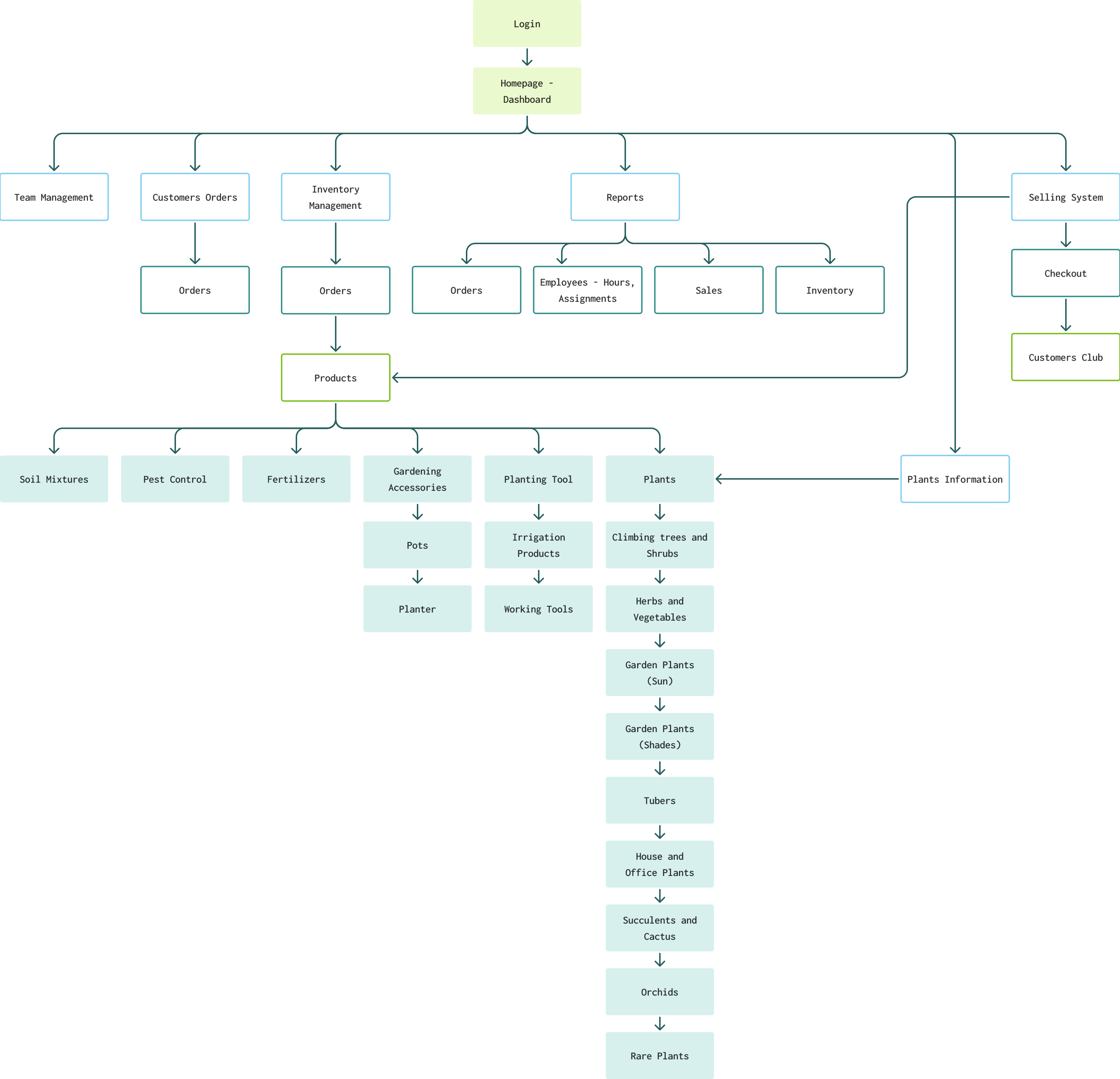
The system includes three distinct interfaces: a client-side map, a business-side map for nursery employees, and a comprehensive site map for the nursery manager.

What you see here is the nursery manager's site map, designed to provide an all-encompassing view of the available features and tools.

The system includes three distinct interfaces: a client-side map, a business-side map for nursery employees, and a comprehensive site map for the nursery manager.

What you see here is the nursery manager's site map, designed to provide an all-encompassing view of the available features and tools.

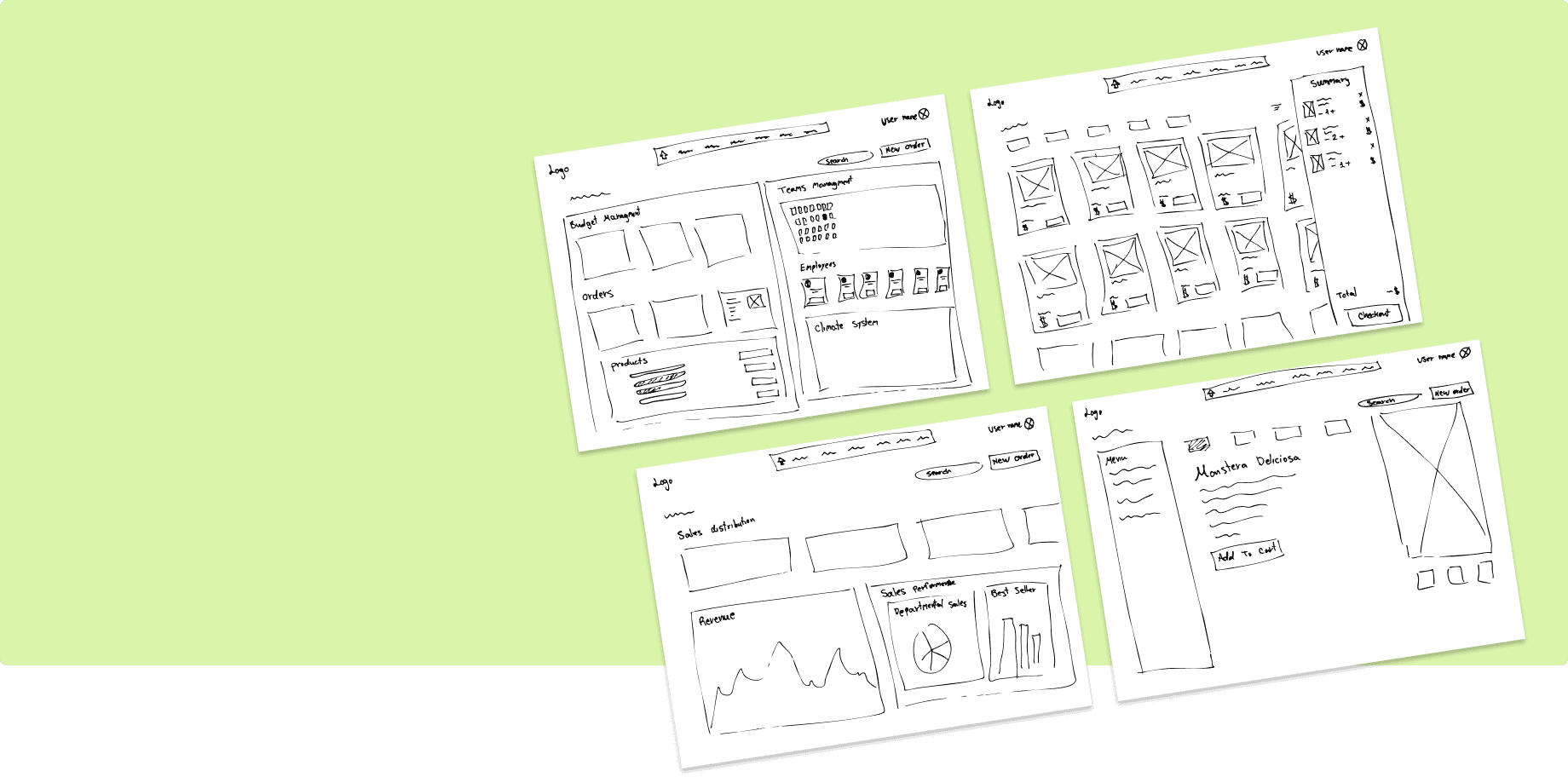
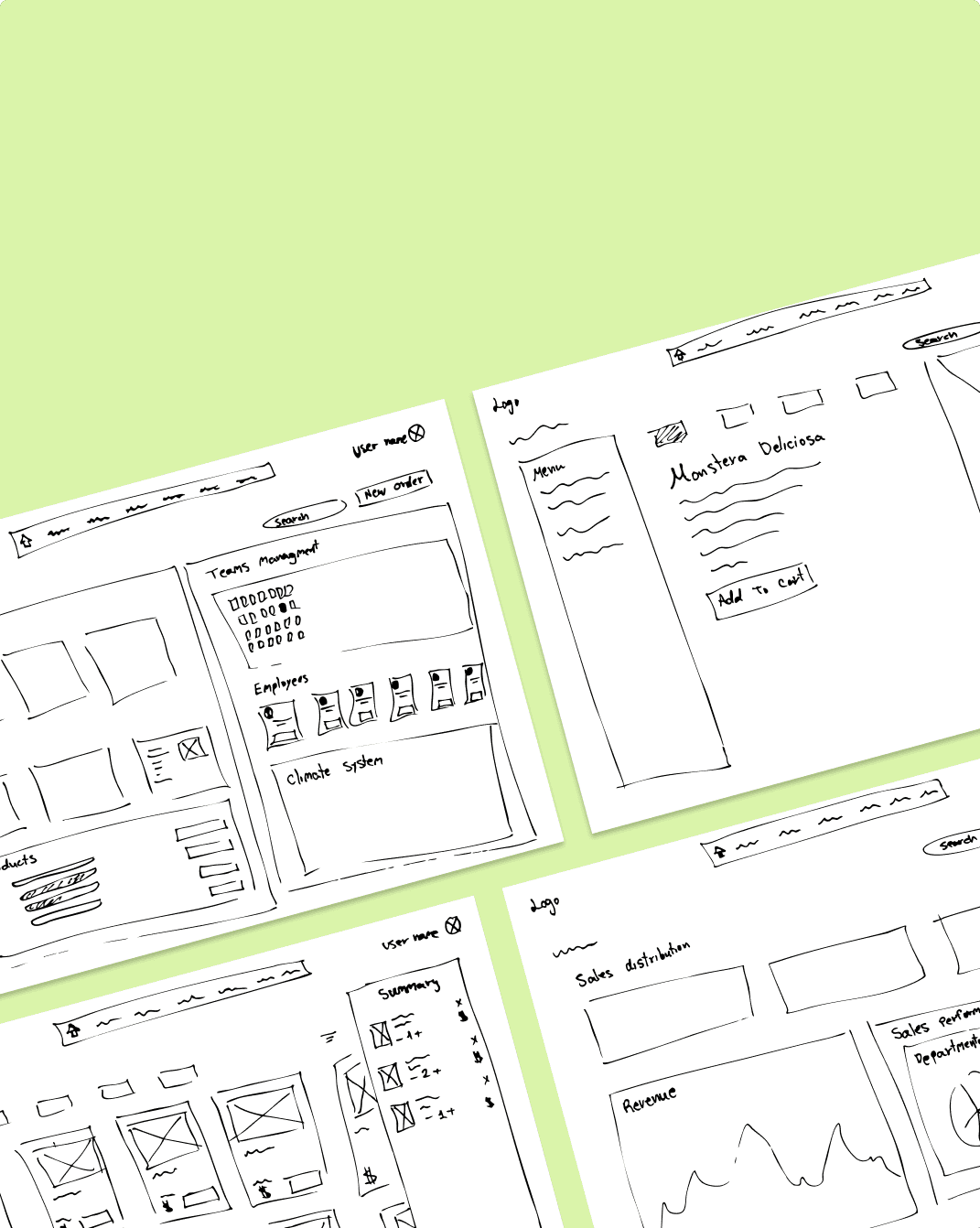
Low-Fidelity

Wireframes

User Flow

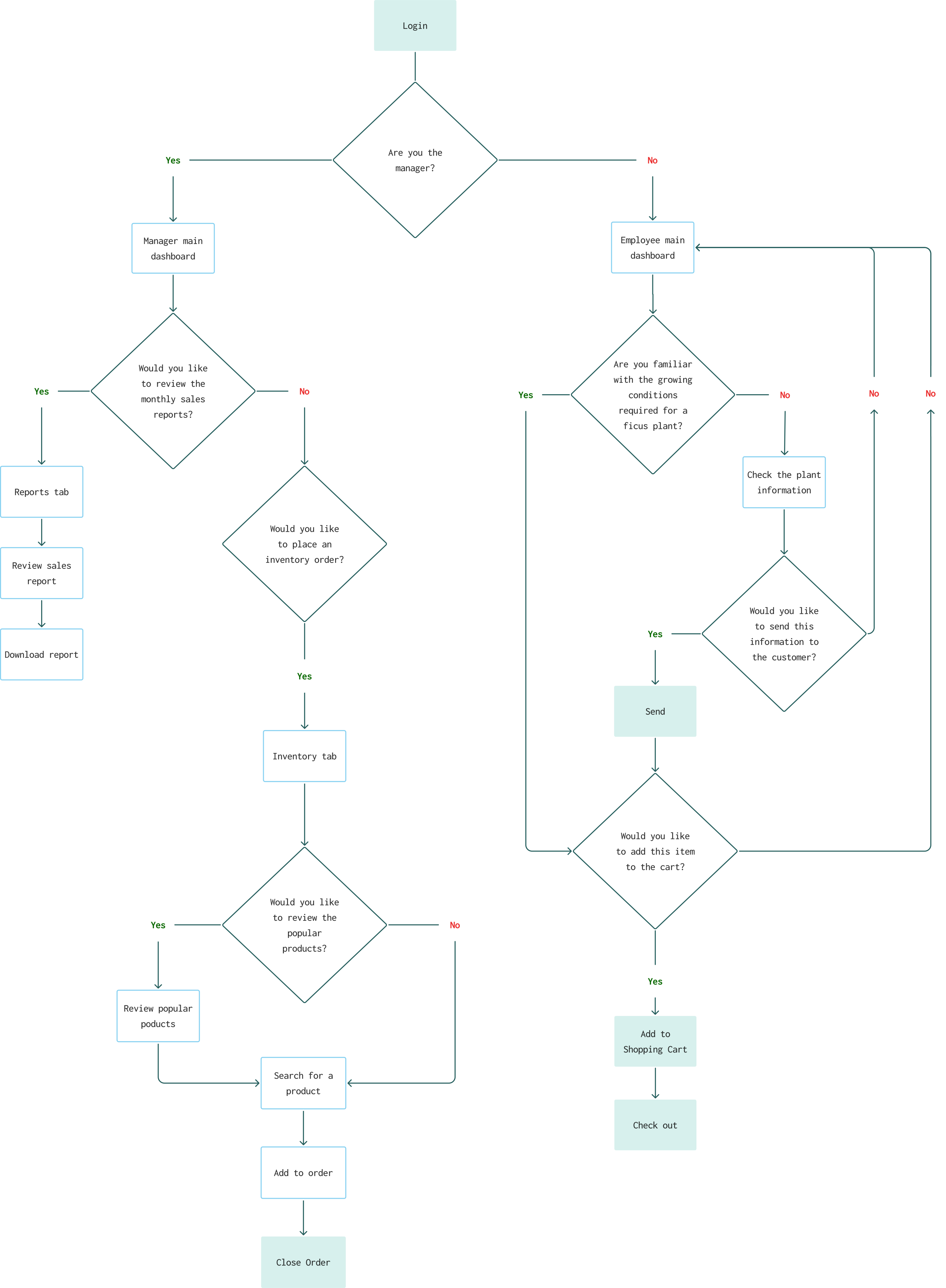
The user flow includes two slides: one for a nursery worker and one for the nursery manager. Each flow features multiple nodes and decision points, ensuring the user's journey progresses smoothly without reaching any dead ends.

The screens I created focus on the nursery manager's user flow.

The user flow includes two slides: one for a nursery worker and one for the nursery manager. Each flow features multiple nodes and decision points, ensuring the user's journey progresses smoothly without reaching any dead ends.

The screens I created focus on the nursery manager's user flow.

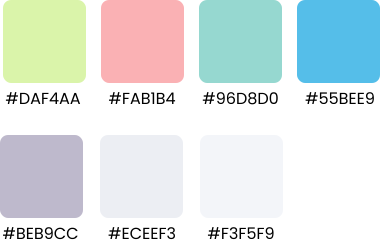
Colors and Typography

Colors

Typography

Urbanist

H1

32px

H2

24px

H3

18px

Paragraph

16px

Smaller text

12px

Main Manager Dashboard

The manager dashboard centralizes key operations and KPIs, offering quick access to sales performance, inventory levels, and employee activity.
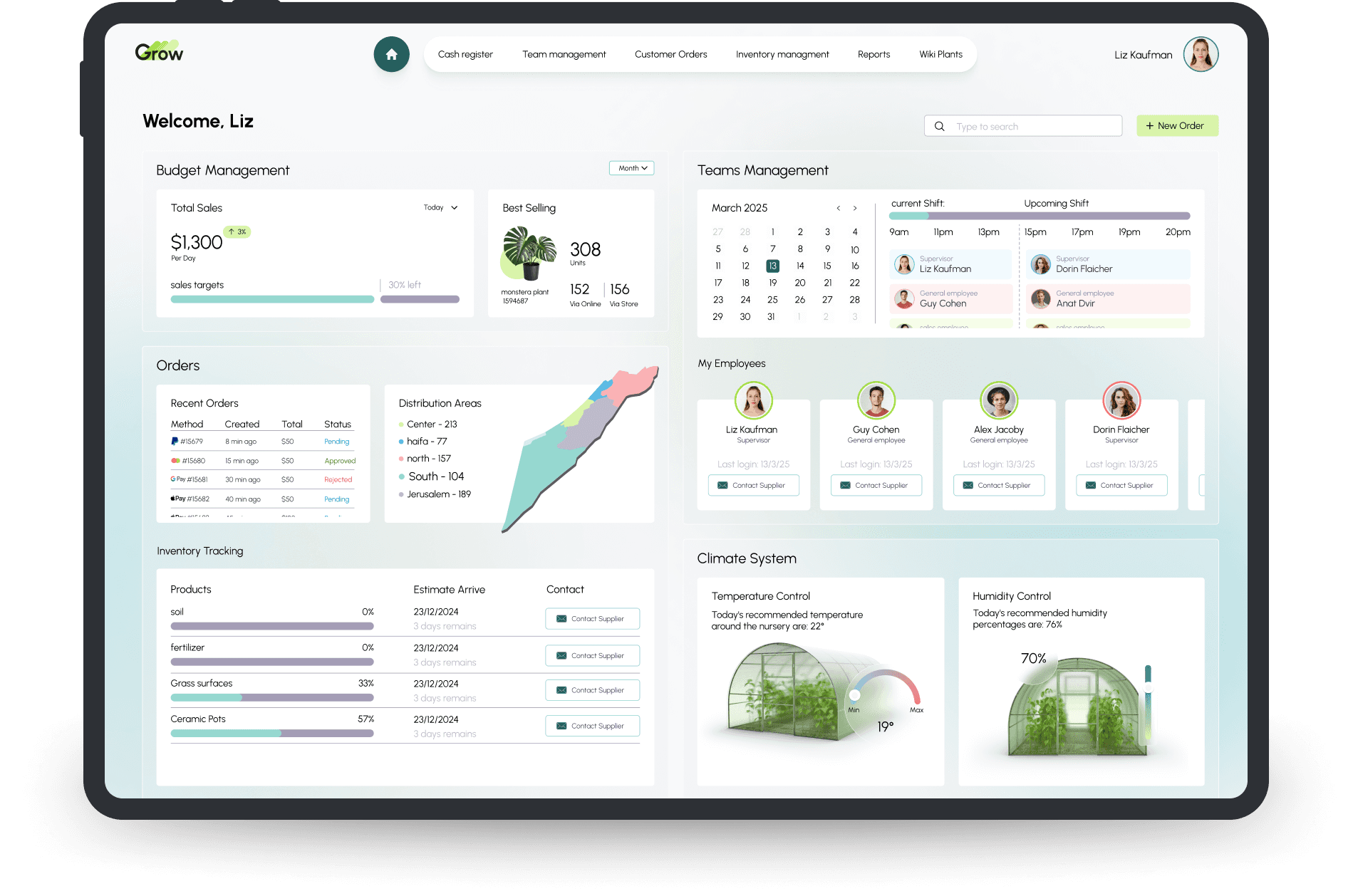
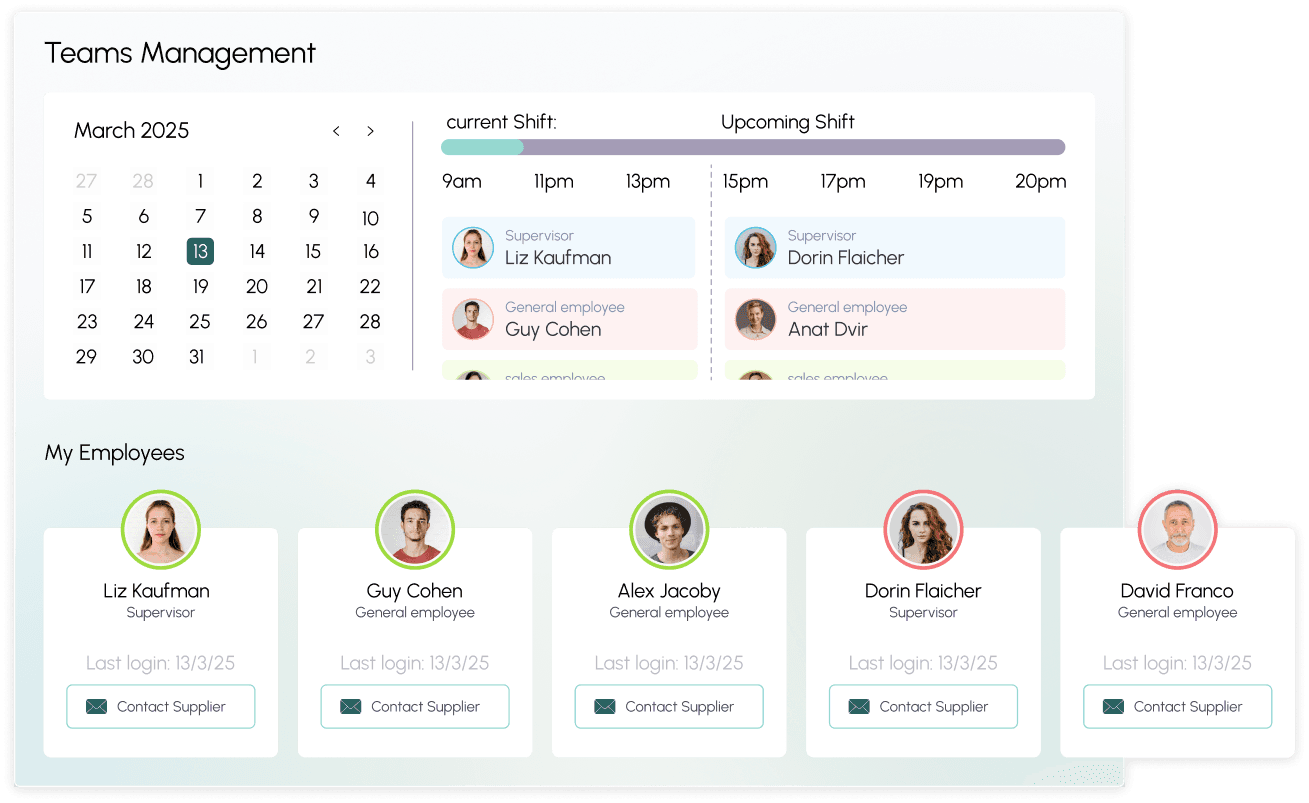
The Teams widget

The Teams widget

The Teams widget provides a clear overview of employee activity and status in real time.

  • It displays key details such as logged-in employees, shift schedules, attendance, and task assignments.

  • Managers can quickly identify who is on duty, review team performance, and assign tasks directly from the widget.

The Teams widget provides a clear overview of employee activity and status in real time.

  • It displays key details such as logged-in employees, shift schedules, attendance, and task assignments.

  • Managers can quickly identify who is on duty, review team performance, and assign tasks directly from the widget.

The Orders Widget

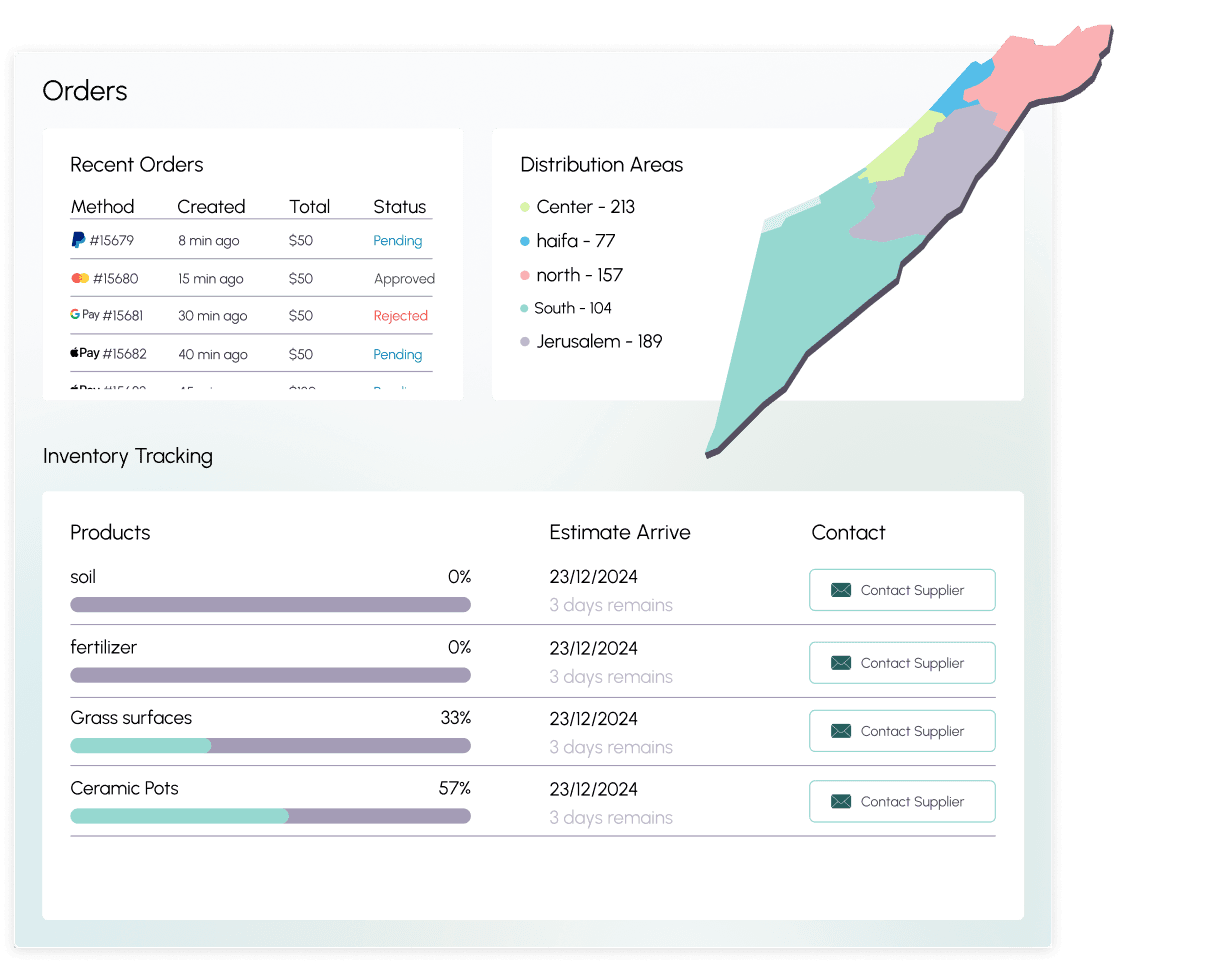
The Orders widget offers a quick overview of current and recent orders, including their statuses (e.g., pending, in progress, or completed).

Managers can track order details, prioritize urgent requests, and access shortcuts to update or process orders. This widget ensures efficient order management, helping teams stay organized and responsive to customer needs.

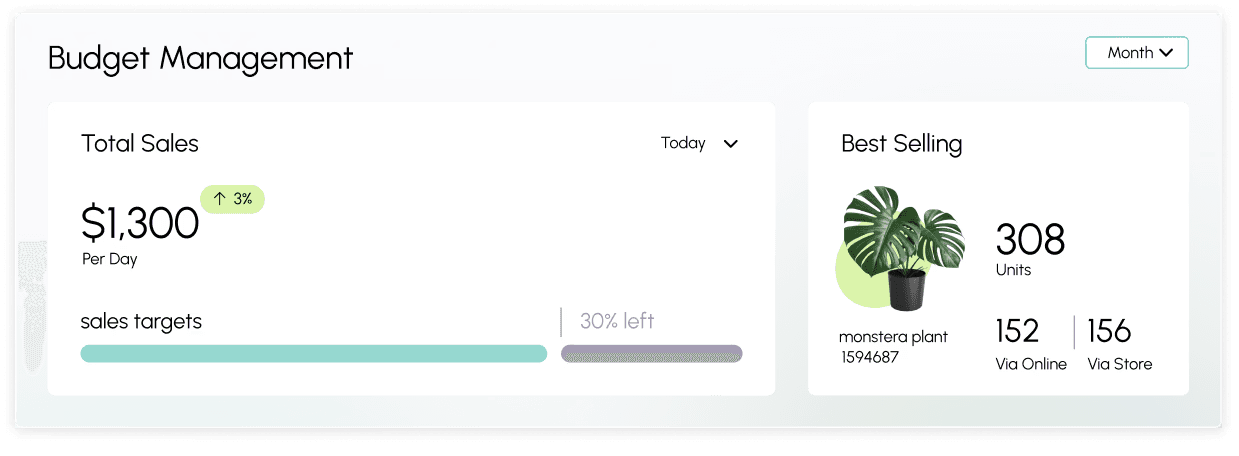
The Budgets Management Widget

Provides a snapshot of key financial performance metrics and allows filtering by time periods, including today, month, or year:

  • Displays revenue for the selected period

  • Tracks progress toward sales goals

  • Highlight the best selling product, helps the manager make informed decisions about what to stock and prioritize for future orders.
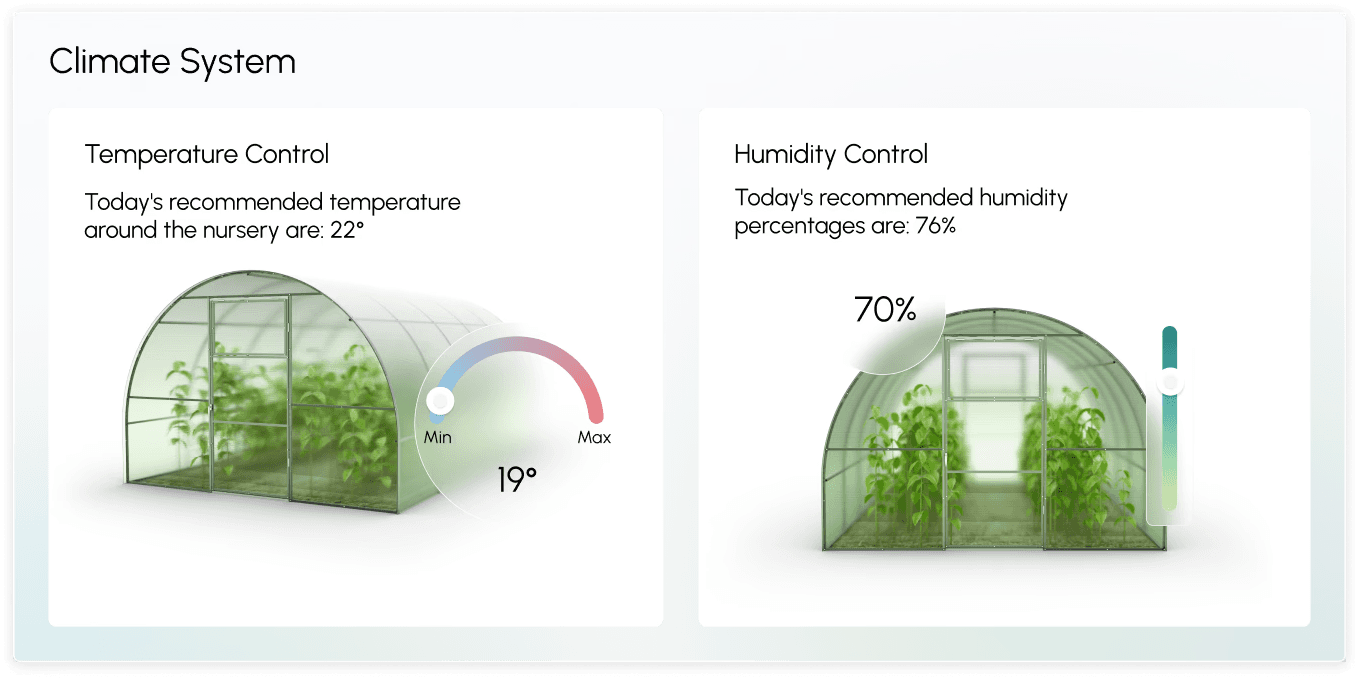
The Climate System Widget

The Climate System Widget

This widget enables the manager to monitor and adjust climate settings to maintain a healthy environment for plants, ensuring optimal conditions for growth and productivity. Displays revenue for the selected period

This widget enables the manager to monitor and adjust climate settings to maintain a healthy environment for plants, ensuring optimal conditions for growth and productivity. Displays revenue for the selected period

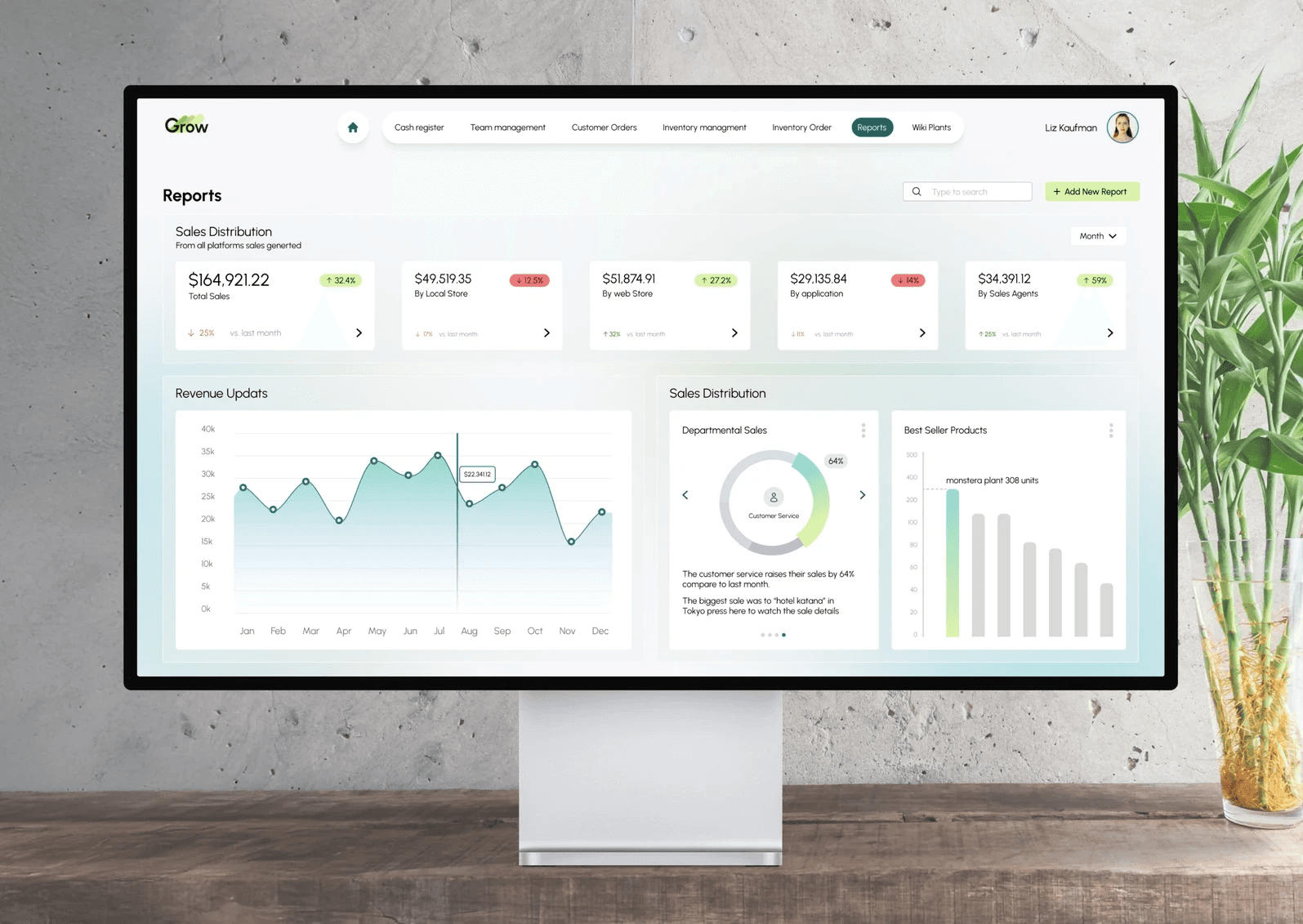
Reports Dashboard

Reports Dashboard

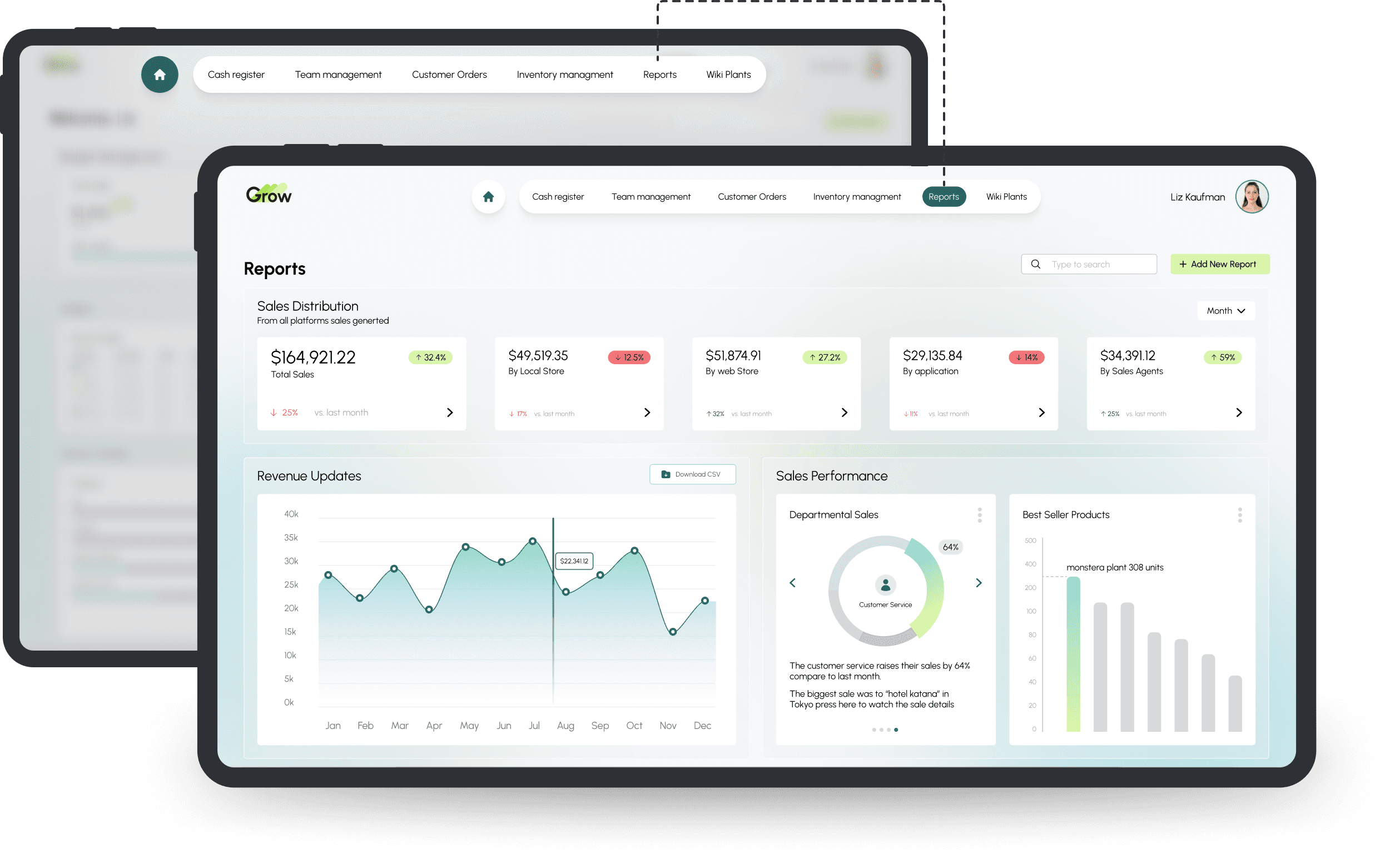
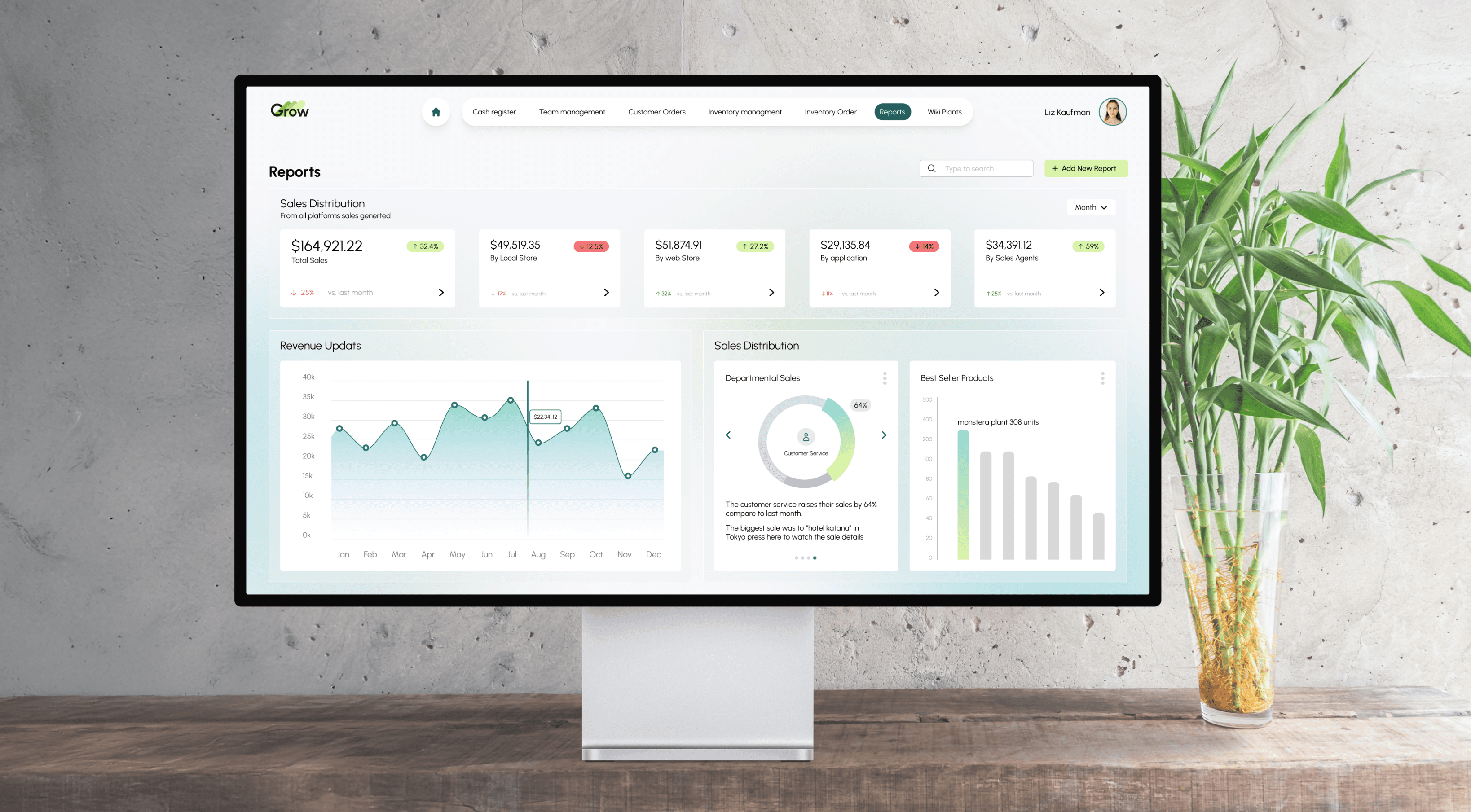
This dashboard helps managers track, analyze, and act on business performance, from sales and inventory to workforce and delivery management, offering a holistic view of operations.

This dashboard helps managers track, analyze, and act on business performance, from sales and inventory to workforce and delivery management, offering a holistic view of operations.

Sales Distribution Widget

The widget provides a detailed breakdown of how sales are spread across different channels such as online sales, in-store purchases etc.

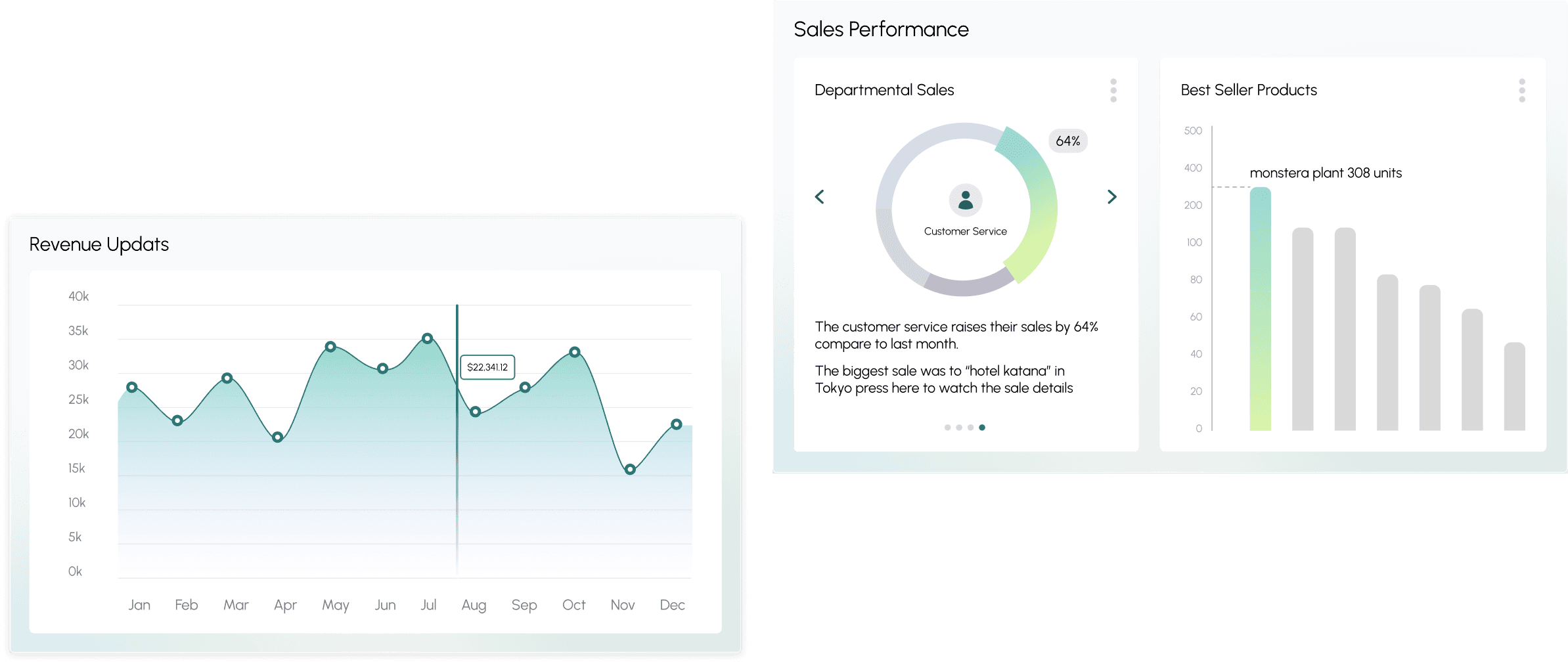
The Revenue Update & Sales Distribution Widget

  • Revenue Update: Displays real-time revenue data, including today's total sales and progress toward sales targets. It shows a visual progress bar for managers to easily track how close they are to reaching their goals.

  • Product Performance:

    • Highlights top-selling products or categories, allowing managers to make informed decisions about inventory and ordering.

    • Displays sales performance across different departments (e.g., plants, accessories, tools), allowing managers to see which areas are generating the most revenue.
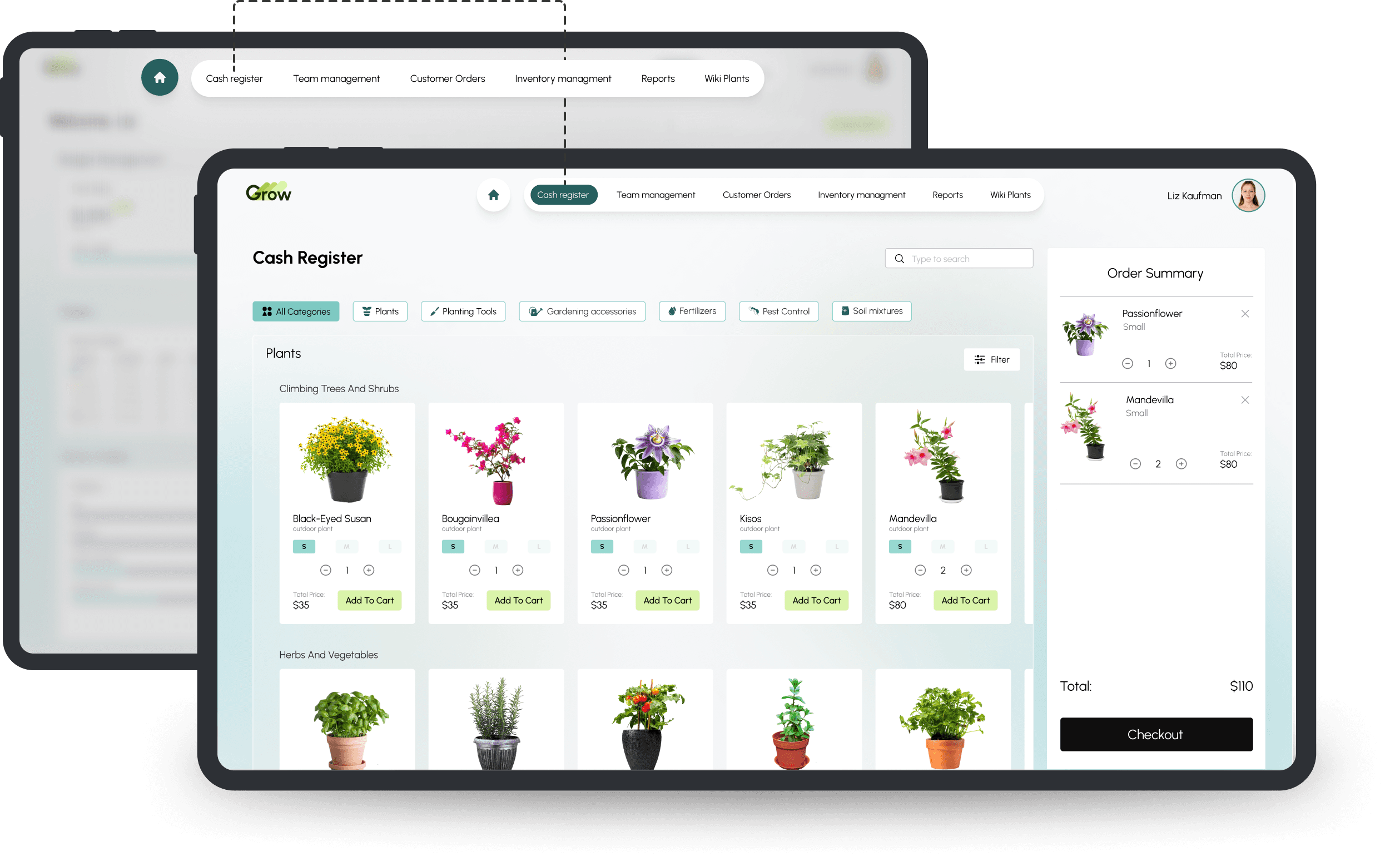
Cash register System

The Cash Register System is designed to streamline the point-of-sale (POS) process, allowing both employees and managers
to efficiently handle transactions. Key features include:

  • Filter by Categories: easily filter products by categories such as type of plants (e.g., indoor, outdoor) or product types (e.g., tools, accessories) to quickly find and add items to the cart.

  • Quick Access to Add Products: after adding products to the cart, employees can quickly add more products with a single click, streamlining the checkout process.

  • Product Search: enables search for specific products by name or category, making it easier to find and add items without scrolling through the entire inventory.

  • Barcode Scanning: Allows employees to scan product barcodes directly to add items to the cart, reducing errors and speeding up the checkout process.
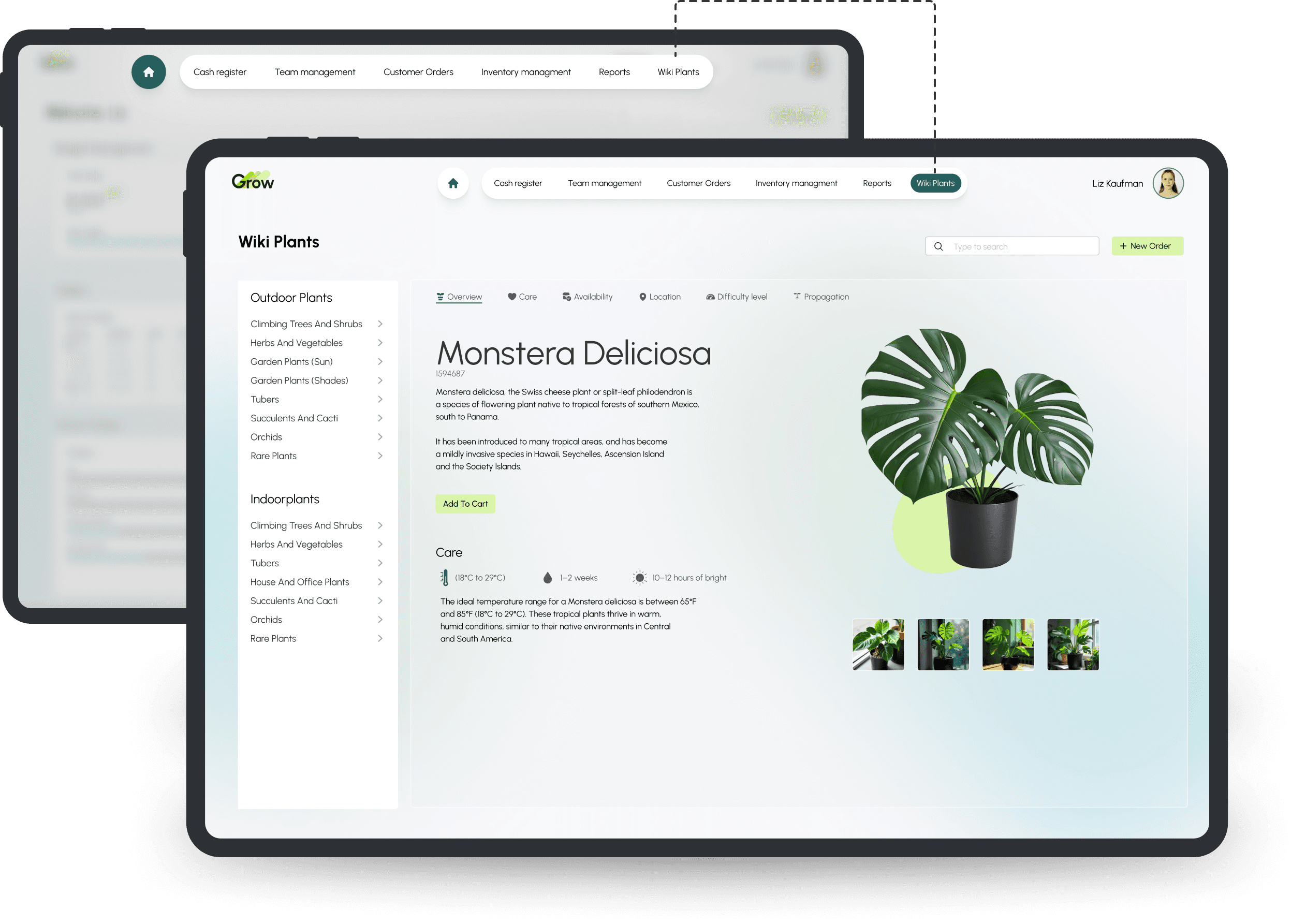
Wiki Plants

The widget is designed to serve both customers and employees, providing essential plant-related information to enhance the customer experience and support staff knowledge.

Key features include:

  • Plant Profiles: detailed descriptions of plants, including growth conditions, care instructions, and ideal environments.

  • Search & Filter: search for plants based on type, care level, sunlight needs, and more.

  • Stock Management: quickly check plant availability.
This project was created in collaboration with May Elazar.

Contact me

Got a project in mind? As a product designer and UX/UI expert, I can help turn your ideas into a seamless, user-friendly experience. Let’s build something great together!
Wireframes

Wireframes

avivhavkin.com

Wednesday, March 18

Copyrights © 2025 Aviv Havkin. All Rights Reserved.

avivhavkin.com

Wednesday, March 18

Copyrights © 2025 Aviv Havkin. All Rights Reserved.

avivhavkin.com

Copyrights © 2025 Aviv Havkin.
All Rights Reserved.